

ezeep is the First Cloud Print Solution for Windows Protected Print (WPP)
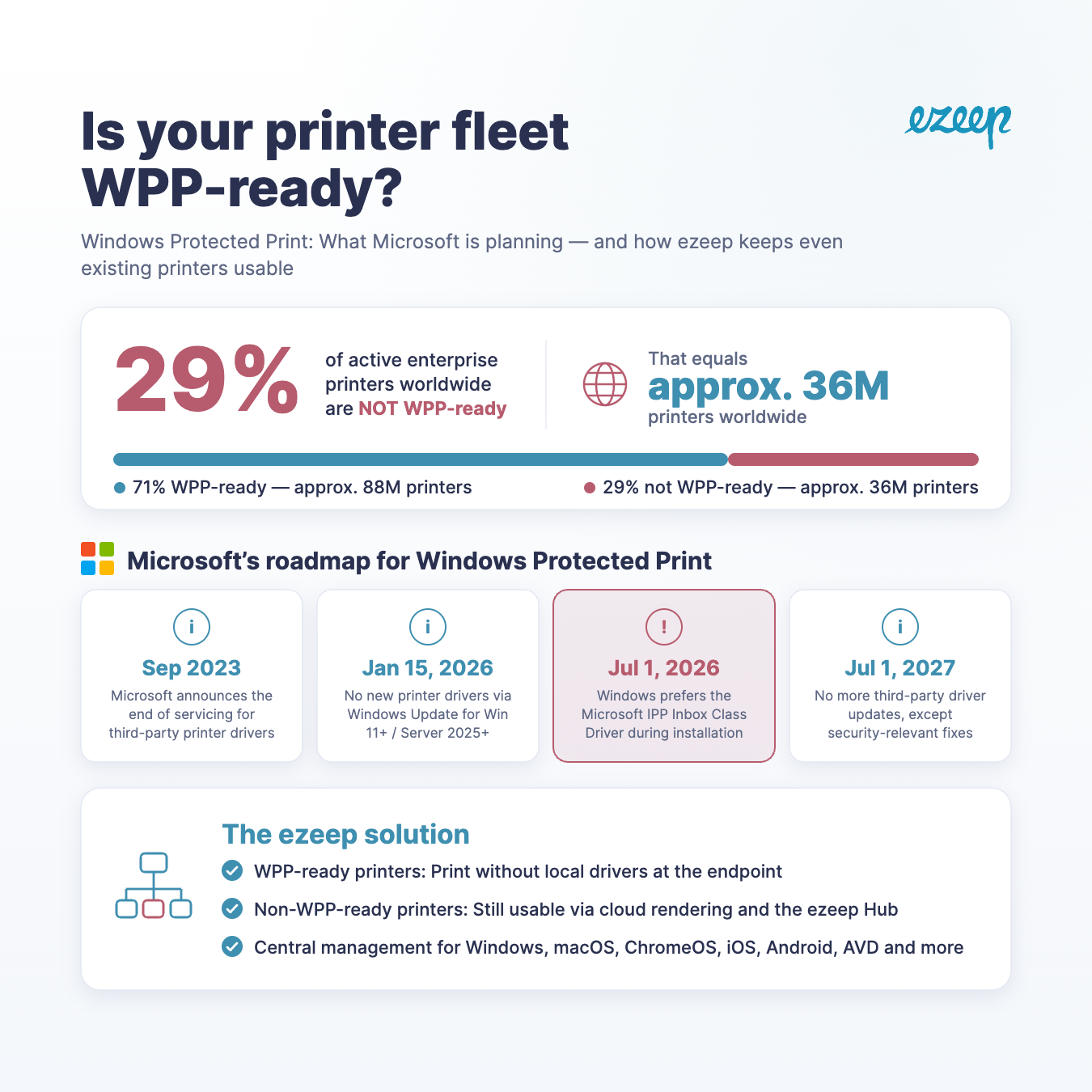
About 36 Million printers are not yet WPP ready
ezeep makes WPP and productive printing compatible for the first time – without compromising on security or user convenience.
Windows Protected Print is an important security feature. But not all printers are supported. With ezeep you can enable WPP and continue using their existing devices.”
BERLIN, BERLIN, GERMANY, June 10, 2026 /EINPresswire.com/ -- Activating Windows Protected Print from Microsoft lays the foundation for a future-proof printing environment. The problem is that employees can no longer print using conventional print solutions. Estimates suggest that approximately 35 million print devices are not WPP-capable. ezeep resolves this dilemma as the first cloud print solution fully compatible with WPP – entirely without drivers, completely from the cloud.— Charlotte Künzell, CEO of ThinPrint, the company behind ezeep
For years, the Windows print infrastructure has been a well-known entry point for cyberattacks – vulnerabilities such as PrintNightmare have proven just how serious this risk is. With Windows Protected Print (WPP), Microsoft responds decisively: WPP relies entirely on the open IPP protocol and does away with conventional third-party printer drivers.
The end of life for legacy printer drivers is approaching gradually. In July 2026, Windows will prioritize the IPP Class Driver by default – traditional drivers will be phased out step by step.
The Problem: WPP Makes Conventional Printing Impossible
As sensible as WPP is from a security perspective, the practical consequences for day-to-day printing are significant. Once WPP is enabled on a Windows device, printing with virtually all conventional print solutions ceases to function. Drivers that have reliably done their job for years are blocked. Printers that were previously integrated without issue suddenly become unreachable. Estimates suggest this affects 35 million devices.
IT administrators are therefore faced with a genuine dilemma:
- Enable WPP – and effectively disable the company's print infrastructure.
- Disable WPP – and knowingly accept security risks.
The Solution: ezeep App for Windows Protected Print
The ezeep Print App for Windows now supports WPP and is now available as a solution that frees organizations from this dilemma. The application has been specifically enhanced for WPP-protected environments and enables seamless cloud printing – fully within the security architecture defined by Microsoft.
Key Benefits at a Glance:
- Full WPP Compatibility: Printing works even with Windows Protected Print enabled – without any reduction in security level.
- No Drivers Required: The app leverages ezeep's cloud rendering – local printer drivers are not needed.
- Centralized Management: Printer assignment and management are handled conveniently via the ezeep Portal.
- Seamless User Experience: Employees print as usual – no workarounds, no manual intervention needed.
- Future-Proof: The solution is aligned with Microsoft's long-term print strategy and supports organizations throughout the entire WPP migration process.
"Windows Protected Print is an important and correct step by Microsoft, and organizations should enable this security feature. In practice, the challenge is often that not all printers are supported. This is exactly where ezeep comes in: organizations can enable WPP and continue printing with their existing devices. With ezeep, security and compatibility are no longer mutually exclusive," said Charlotte Künzell, CEO of ThinPrint, the company behind ezeep.
Availability
The ezeep App for Windows with WPP support is available immediately. Interested companies can start a free trail: Free Trial | Try ezeep Cloud Printing Free
About ezeep
Our mission is simple: with ezeep, we turn printing into infrastructure you never have to think about again. For organizations that rely on printing but don't want to manage it themselves, we make sure it just works – securely, reliably, and everywhere.
The ezeep platform offers driverless and serverless cloud printing for hybrid teams, virtual desktops, multi-site enterprises, and developer-driven workflows. It was developed by ThinPrint, an enterprise print software provider founded in 1999 and headquartered in Berlin. ezeep is used in coworking spaces, healthcare, education, retail, warehousing, and enterprise IT. It integrates with Microsoft 365, Google Workspace, Zapier, Make, as well as via the ezeep API and MCP server for AI agents.
Press & Media Inquiries | Contact ezeep
Silke Kluckert, Public Relations Manager, press@thinprint.com,
Phone: +49-(0) 30 408198-725
Silke Kluckert
ThinPrint GmbH
+49 30 408198725
email us here
Visit us on social media:
LinkedIn
Instagram
Facebook
YouTube
X
Legal Disclaimer:
EIN Presswire provides this news content "as is" without warranty of any kind. We do not accept any responsibility or liability for the accuracy, content, images, videos, licenses, completeness, legality, or reliability of the information contained in this article. If you have any complaints or copyright issues related to this article, kindly contact the author above.
